https://www.ribbonfarm.com/2009/10/07/the-gervais-principle-or-the-office-according-to-the-office/
Monday, May 30, 2022

Friday, April 8, 2022
What Protocol Lutron Caseta Uses
https://www.smarthomepoint.com/lutron-caseta-protocol-clear-connect/
I'm a big fan of Lutron Caseta smart switches and this article does a good job of explaining how their protocol is more robust and faster than others. I've noticed how fast it is to respond to commands sent from Home Assistant.
Lutron Caséta uses the Clear Connect RF communications protocol. This uses an entirely different frequency (434 MHz) from both Wi-Fi and 2.4 Gigahertz alternatives like ZigBee. The biggest reason for this change is to operate on a little-used frequency which gives users a better experience. Let’s take a closer look at why Lutron took the path less traveled.
Monday, March 28, 2022
Saturday, February 19, 2022
How to upgrade hard drives on a Linux file server
Another in my series of blog posts about "The way I do things that fit my very specific and peculiar set of needs". I recently upgraded my HDDs in my Linux file server, and found a pattern that worked quite well with minimum disruption.
How I have things set up
I have a headless Linux server with a SSD as the primary drive, and then a few spinning HDDs for bulk media storage. All the drives are just formatted in ext4. I do backups to S3 for important files. Then, every time I upgrade the storage of these drives I copy everything to the new drive, and then remove the old drive from the machine. That old drive serves as a backup for the bulk media stuff, combined with the plan to just redownload anything I got recently.
I've never bothered with RAID or more complex file systems because they only made sense to me if I had 4 or more drives, which I've never had. This makes upgrading the drives a simple process.
My /etc/fstab file has a bunch of lines like this:UUID=9fa3b7dc-3cd7-42c1-93a8-46dcf38da09d /mnt/media ext4 defaults 0 2
And then I share those drives using NFS by putting these lines in /etc/exports:
/mnt/media 192.168.1.0/24(rw,sync,no_subtree_check,no_root_squash)
Format the new drive
Put the drive in the machine and power it on. If the drive is brand new it won't have any partition tables on it, or the UUID needed for the fstab file. Here's a bunch of commands which are useful for figuring out which drive is which:
sudo blkid
lsblk -f
sudo fdisk -l
Once you know what the path to the drive is (eg, /dev/sdb), you can use fdisk to format the drive. Be sure you have picked the right drive, because you'll wipe all your data on whatever disk you run fdisk on. Use m to see the list of fdisk commands. But both F and p are useful to confirm you have the right (empty) disk. Once you're sure you can run g to create the partition table, and then n to create the new partition. The defaults should be fine. Once you are sure you have things right, you can write your changes to the disk with w.
You now need to create the ext4 filesystem on your partition. Do that with sudo mkfs.ext4 /dev/sdb1 making sure that your use the correct drive letter.
Mount the new drive
Now run the above commands used to identify the drives again, and hopefully you see a UUID for the new drive. Copy that UUID down and edit your fstab file with sudo nano /etc/fstab
/mnt/media_new. Then you need to make sure you create that mount point (sudo mkdir /mnt/media_new). Then you can mount the drive with sudo mount -av . Now you can poke around and make sure things look right, you probably want to update the owner with sudo chown.Copy the old data to the new drive
There are many ways you could copy the data, but I like rsync. One nice thing is that if it gets interrupted it'll pick up where it left off. Here's the command I came up with after exploring the options for a while: rsync -axHAWXS --info=progress2 /mnt/media/ /mnt/media_new/ The options largely came from here, so you can go there if you want to read what they do. That took about 12 hours for me to copy about 5 TB. While it will print out the progress, I found it much better to just ssh in on a new tab and then run df -Th and compare the disk usage of the old and new drives. After the first pass though, running it again, to make sure there wasn't anything new, only took a couple minutes.
Make the swap
This isn't a foolproof process, you should close anything that is using the disks, and run the rsync command one more time. Then you can unmount the current drive with sudo umount /dev/sda1. Now you want to edit your fstab one more time and delete the old drive's line from it, while updating the mount point of the new drive to the one the old drive was using. Now you can probably get way with just running sudo mount -av again, but I like to just shutdown (sudo shutdown -h now), and physically remove the old drive.
That's it
That's it. If all went according to plan, then everything that used the old drive previously, should now just use the new drive. I had to restart my remote machines that used the NFS drives before they would connect.
Friday, February 11, 2022
Rome: Decline and Fall?
https://acoup.blog/2022/02/11/collections-rome-decline-and-fall-part-iii-things/
But this now raises two related questions: first, why did population decline so sharply and second, what was the impact on quality of life that resulted? The old answer to the first question was of course ‘the barbarians killed everyone’ but as we’ve seen, while the fifth century was a violent time, the violent discontinuities were not that extreme. Surely the violence of the period has something to do with some of this declining population, but as noted, the underlying population (with their language and religion) didn’t much change (and the raw number of ‘barbarians’ coming over the frontier was, in demographic terms, fairly small). Most of those Roman cities decayed, rather than being burned. But if the ‘barbarians’ didn’t kill everyone, what did and why did that somehow have a negative impact on the survivors? The answers to these two questions are actually linked in that they depend on the same evidence, so that is where we will go next.
...
If you will permit me an extended metaphor, Rome wasn’t so much demolished by invaders as it was burned down by Roman arsonists who set fire to their own house – and they had been setting those fires since at least 235, long before Adrianople. The emperors of the fourth century (particularly Diocletian and Constantine) may have put out some of the fires by collapsing a wing of the house to smother them, but this can hardly be regarded as improvement, not the least because neither of them did anything to deal with the arsonists (one of which, Constantine, at least, must be reckoned). The emperors of the late fourth and fifth centuries then proceeded to invite people into the house, promising its shelter, if only they would help them light one more fire – and then when the house was burned down and everyone was left on the cold ground, they tried to shift the blame onto the very guests they had invited.
Wednesday, January 19, 2022
How GPS works
This guy goes into so much detail, with great visualizations of everything he explains. It's always a treat when he publishes a new post.
Monday, December 13, 2021
My method for backing up a Raspberry Pi
Intro
I have a vast army of Raspberry Pis serving me (although recently I've been liking ESP32 for some of the simpler tasks I've used to use Pis for, and mini PCs for the more complex ones). I just had my first SD card failure in one. This was a bit more annoying than I predicted it would be, so I set out to come up with a good automated backup process for my Pis. As with everything I do, there are plenty of good write ups about how to do this online, and you will undoubtedly find those more useful if you actually want to do this, but I will document what I did here for 1. hypothetical fellow weirdos, 2. myself from the future.
NFS Server
I have a home server, with all my bulk storage in it. I primarily run Plex and Home Assistant on it, but I also host my music collection on it, which I share out to my desktop and other clients via NFS. NFS is just the Linux version of network shared drives. I won't go into details about how to set up NFS, but this is a good overview.
Backup Script
Once you have a NFS server set up, you can just mount a drive there on your Pi with write access. I then use rsync to send directories to the network drive nightly. Here's my script along with some notes.
I chose the directories with configuration and data that I cared about in them, although it should cover most uses.Sunday, November 21, 2021
Fixing Christmas lights with a BBQ lighter
I have an old Christmas tree with several independent prewired light segments on it. About half of these segments no longer work. I figured it was just a matter of finding the blown out bulbs and replacing them. I also knew the sets always claimed that if "one blows out, the rest stay on", but in practice those claims seem to not pan out.
In researching how to find the dead bulbs I came across a product called the Light Keeper Pro. I didn't really understand how this product worked, or even really what it was supposed to do, but it was only $20, and I was confident I could fix the lights with the right tools.


The device has a lot of functions built in; it's really a Christmas light Swiss Army Knife. The one I thought I'd be using is the bulb tester, where you just pull the bulb out and stick it in the top and it'll light up if it works. There's a similar fuse tests, although the company reiterates several times that fuses are rarely the problem. There is also a non-contact voltage detector, which I have several of already, but is nice to have on there. It's only useful for faults where there is a break in the circuit, like a missing bulb, or a cut wire. There's a bulb remover tool, which I haven't really been able to figure out, and haven't tried very hard because I don't have trouble just pulling the bulbs out.
The star of the show though, is the quick fix trigger. The instructions explain you remove any bulb from a non-working section and insert the socket into the front of the device (essentially the device fits like a giant "bulb"). You then click the trigger several times, and the lights somehow come on. You do all this while the lights are plugged into the wall.
I almost skipped even trying this because it seemed so absurd. But once I figured out exactly what they wanted me to try, I did it, and it worked, over and over again. There were probably 5 different sections on this tree that didn't work, and this thing fixed each one in 30 seconds. Now, to be clear, it doesn't make blown out bulbs come back on, but it does make it so that the "one blows out, the rest stay on" function actually works. After the section comes back on you have to replace the burned out bulbs with new ones.
It may not surprise you that this led to me learning a lot about Christmas lights. Now you're going to learn a lot about Christmas lights too.
How do Christmas lights work?
They start out pretty simple. 50 bulbs, each with a resistance of about 2.5Ω are in series. Their resistances add, and so overall the string has a resistance of about 125Ω. You plug that into 120 VAC and you get about 1 amp flowing through them. You can imagine that each bulb shares an equal portion of the voltage, so each bulb has 120 / 50 = 2.4 volts across it. If you took a single bulb and put 2.4 volts across it, it'd light up the same as if it were in a set. The filament is just a piece of wire, which is so thin that it heats up very hot when the amp is flowing through it, and it glows. Eventually that filament wears out and literally burns out from the heat. At that point, the filament is gone and there is a gap which the current can't flow over. Since every bulb is in series, current can't flow at all, and the entire set goes out.

I took this picture from here and it shows the situation. If your set has more than 50 bulbs then it probably has a multiple of 50 (100, 150, etc). In that case it's just a few of these sets of 50 just all connected together at the plug, like the next picture shows.

How do "one blows out, the rest stay on" lights work?
The magic of these is entirely within the bulb. The wiring is same as above, just bulbs connected in series, but the difference is a "shunt" in the base of each bulb. The idea is that if filament burns out, then the current can instead travel over the shunt. The shunt is much thicker, so it doesn't heat up and glow.
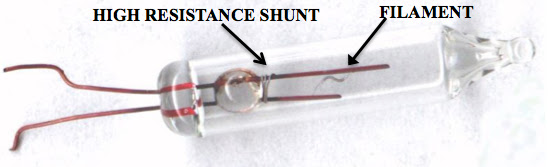

How do these shunts work?
This is the key to this entire post. The shunts can't just be another piece of wire, because all the current would just travel over that instead of the filament. They need to be "off" normally, and only get activated when the filament blows out. The shunt is just a piece of oxidized aluminum wire. The oxidation makes it high resistance, and when there is the normal 2.4 VAC across the bulb the shunt does not carry a current. If a high voltage is applied to the shunt though, the current will flow through it and the oxidation layer will burn up and you'll be left with a low resistance wire. This is called an antifuse.
How do we get a high voltage to the shunt when the filament burns out?
This just happens. I said above each bulb is sharing the 120 VAC from the wall, equally. However, if there is a gap in the circuit (like a burned out filament), then no current will flow, and the full voltage will build up at the gap. It doesn't matter how much resistance is in the circuit, if it is open, and no current is flowing, then the full voltage will be present at that gap. Therefore, when one of the filaments burns out, the shunt in that bulb gets 120 VAC across it, which is usually enough to burn up the oxide layer on it and turn it into a normal wire. Sometimes the 120 VAC isn't enough though, and that's when the whole set fails despite the "one blows out, the rest stay on" shunts.
How do we fix them?
Now that we know all that, the solution is pretty easy. Just apply a higher voltage. You could do this with some sort of high power transformer (like a ballast from a florescent light), but you'd have to apply the voltage just long enough to trigger the stubborn shunt, and if you applied it too long all the lights would burn out. You'd have milliseconds between when you fixed the shunt and you ruined the entire set.
Luckily there's a simple solution: piezoelectricity. There are certain crystals that when you hit them they produce a high voltage burst, a static electric shock on demand. Any time you press a button and there's a click and a spark that is piezoelectricity. It's how BBQ lighters work, and it's how the Light Keeper Pro works.
All that the Light Keeper Pro is doing is creating a quick burst of high voltage and putting it on the circuit. It's a weird combo of 120 VAC and few milliseconds of 15 kVDC. The 15 kilovolts easily overwhelm the AC voltage, no matter where it is in its AC cycle. The 15 kVDC would fry stuff throughout your house, except it's such a small amount of energy it is easily absorbed by the actual wires long before it can reach anything. The only thing that burst has a chance of reaching, and effecting, is the very sensitive aluminum oxide coating which is preventing the shunt from carrying current.
And that's all there is to it. You could do the exact same thing as the Light Keeper Pro with a BBQ lighter. All it is is a convenient package and way to connect the bulb socket to the piezoelectric spark.
Thursday, October 21, 2021
Friday, September 10, 2021
Suspicious discontinuities
https://danluu.com/discontinuities/
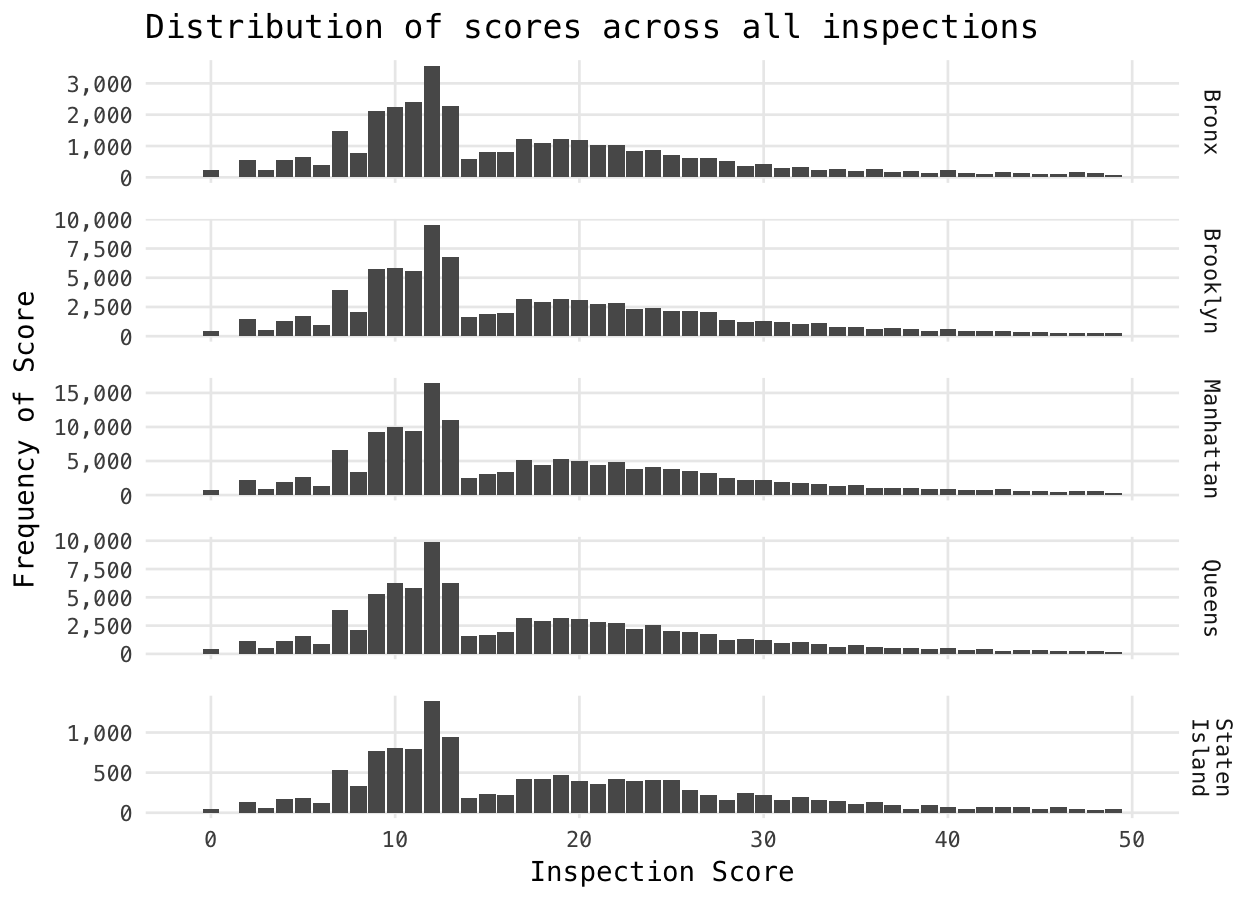
This page is a wall of text and some charts, but it shows some really interesting patterns in a wide array of data sets.
Subscribe to:
Posts (Atom)